Draft Day — Live Board Walkthrough
The Yahoo Fantasy API is temporarily offline, so Scoring Zone can't auto-sync picks from Yahoo in real time. That's fine — you can still run the whole draft together on Scoring Zone, right alongside the real draft on Yahoo. This guide walks the flow with screenshots.
The short version: draft on Yahoo as normal. One person (the host) mirrors each pick into Scoring Zone; everyone else opens a link to watch the live value board — and can enter their own picks when it's their turn.
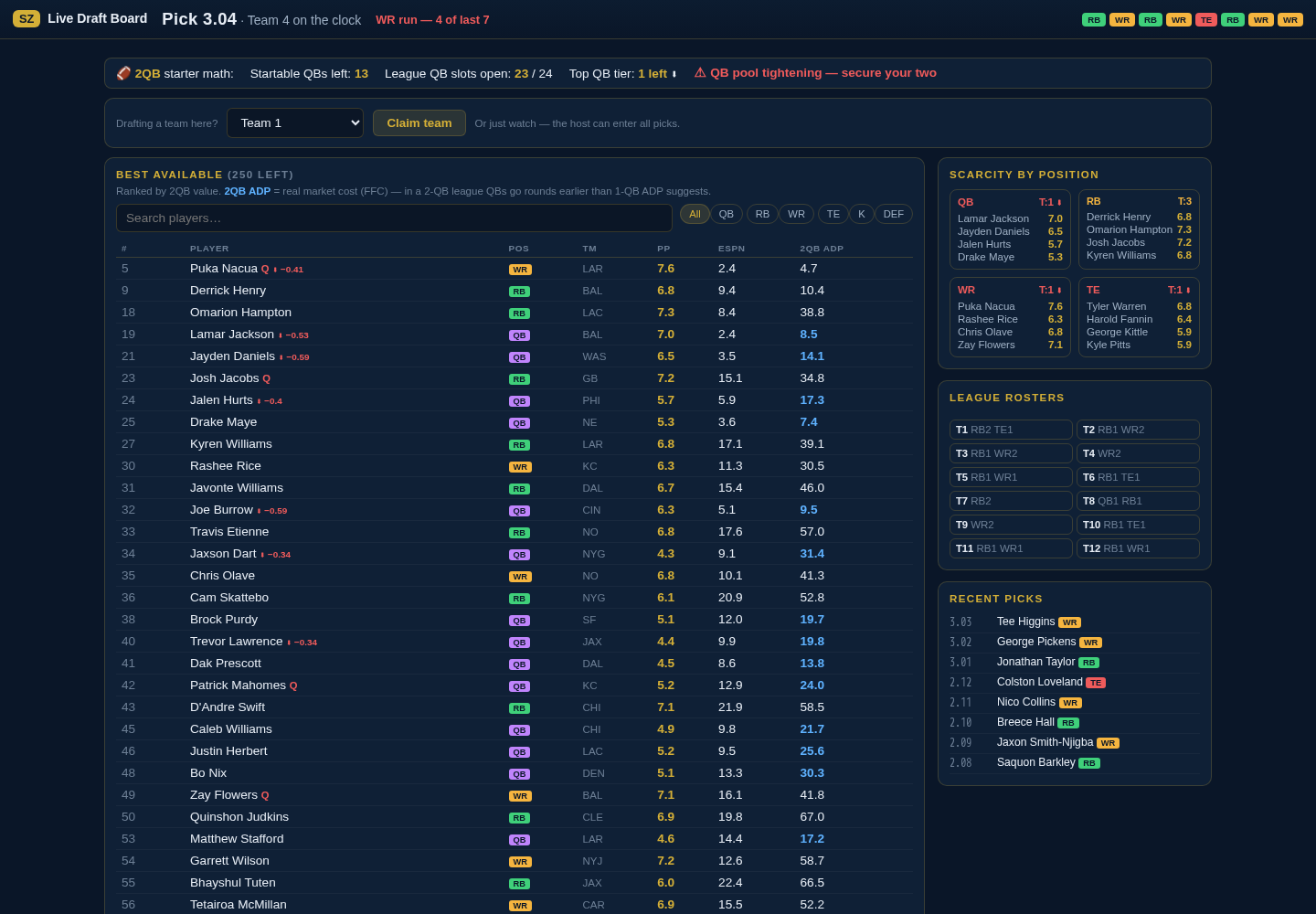 The live board your whole league watches — Best Available (ranked by 2QB value) with the 2QB ADP column, position scarcity, league rosters, and the running pick log. Tap or click to enlarge.
Two ways to use it
| You are… | You do… |
|---|---|
| The host | Run the board in the War Room, type each pick as it happens on Yahoo, draft your own team off the recommendations. |
| A manager | Open the share link, watch the live board, and (optionally) claim your team to enter your own picks. |
Step 1 — Host: start the board
Open the War Room (/draft/live) and set it up to match your league. For the
interim workflow, pick Manual entry as the mode (Yahoo Live is offline):
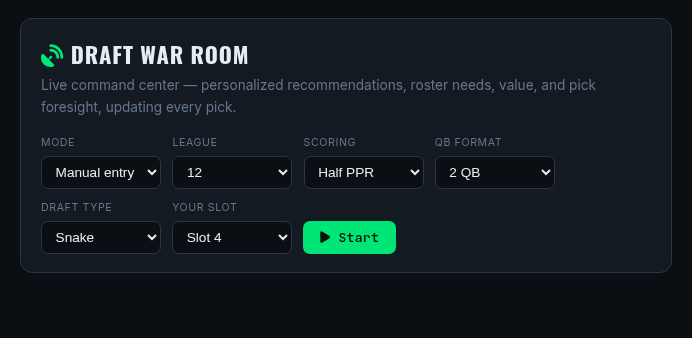 Set Mode → Manual entry, League 12, Scoring Half PPR, QB Format 2 QB,
Draft Type Snake, and Your Slot, then hit Start. (You'll be asked to sign
in first — that's expected; the board is tied to your account.)
Set Mode → Manual entry, League 12, Scoring Half PPR, QB Format 2 QB,
Draft Type Snake, and Your Slot, then hit Start. (You'll be asked to sign
in first — that's expected; the board is tied to your account.)
Once it's running, click Share board. You'll get a short join code (e.g.
ABCDE) and a link. Post it in your league chat:
scoring.zone/j/ABCDE
Step 2 — Everyone: open the board
Anyone with the link lands straight on the live board (shown at the top of this page) — no login required. It updates every few seconds as picks come in: Best Available on the left ranked by 2QB value, position scarcity and league rosters on the right, and the running pick log bottom-right.
The # / PP / ESPN / 2QB ADP columns tell you, at a glance:
- # — the player's value rank in this 2QB half-PPR format.
- PP — PigPro score (our 0–10 composite).
- ESPN — ESPN expert consensus rank.
- 2QB ADP — what the player actually costs in a real 2-QB draft.
Step 3 — Read the top strip
The header always tells you who's on the clock and flags positional runs:
 Pick number, who's up, and a run alert (here: "WR run — 4 of last 7"). The pills on
the right show the last several picks by position so you can feel a run building.
Pick number, who's up, and a run alert (here: "WR run — 4 of last 7"). The pills on
the right show the last several picks by position so you can feel a run building.
Step 4 — Mind the 2QB math
Two starting QBs means QBs go much earlier than a normal (1-QB) draft. The QB bar keeps you honest:
 How many startable QBs remain vs how many QB starting slots the league still has
to fill. When it warns "QB pool tightening — secure your two," don't wait too long.
How many startable QBs remain vs how many QB starting slots the league still has
to fill. When it warns "QB pool tightening — secure your two," don't wait too long.
The one thing to remember: the board ranks by value, which says elite RB/WR first and QB in rounds 2–4. But the 2QB ADP column shows how fast QBs actually leave (e.g. a top QB going ~pick 2, not ~pick 33). If you want an elite QB, you'll have to take him above his value rank — the column tells you exactly how far.
QB BUY/FADE tags are intentionally hidden in 2QB — they were based on stale 1-QB pricing and were misleading. RB/WR BUY/FADE still show.
Step 5 — (Optional) Enter your own pick
Managers can share the typing load. On the board, choose your team from "Drafting a team here?" and click Claim team. Then, whenever it's your turn, a Record my pick box appears — type your player and submit:
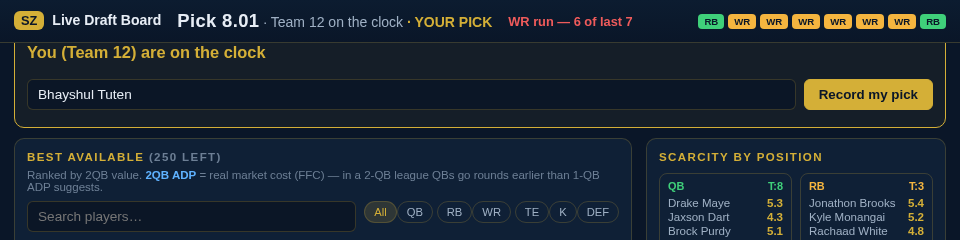 The box only shows up when you're actually on the clock, and it checks it's really
your turn. Type the player, hit Record my pick, done. If you're not up, it stays
hidden — just watch.
The box only shows up when you're actually on the clock, and it checks it's really
your turn. Type the player, hit Record my pick, done. If you're not up, it stays
hidden — just watch.
You can't affect anyone else's draft: watchers are read-only except for their own on-the-clock pick, and the host can always enter a pick for anyone who lags.
If something goes sideways
- Host enters everything — the default; always works. Managers just watch.
- Managers self-enter — spreads the load when the league is engaged.
- Yahoo only — if Scoring Zone is unreachable, draft on Yahoo and reconcile later. Nothing about your Yahoo draft depends on Scoring Zone.
When Yahoo's API approval comes through, live sync returns and this manual mirror goes away. Until then, this is the play.
Operators: see the Draft Day interim workflow runbook for the behind-the-scenes details. Data sources are listed on the Attributions page.