Trading card anatomy
The PigPro trading card is the single player surface across the whole app. Clicking any player name or PigPro score pill — on /draft-analytics, /lineup, /waivers, /offseason-intel, /players, the dashboard, the draft board — opens the same card, backed by the same endpoint (/api/pigpro/card/<identifier>).
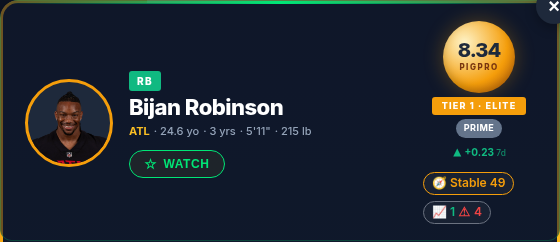 A live card at a glance (Bijan Robinson): gold foil border, headshot, the
 8.34 PigPro ring, TIER 1 · ELITE, the PRIME pill, ▲ +0.23 7d, and the 🧭 Stable 49 situation badge. The sections below break down every field.
Hero section
Foil border
The outer border uses a CSS linear-gradient that shimmers subtly. Color is keyed to tier:
- Gold (
#f59e0b → #fbbf24 → #fef3c7) — Tier 1 / PRIME (score ≥ 7.5). - Silver (
#94a3b8 → #cbd5e1 → #e2e8f0) — Tier 2 / CHOICE (5.5 – 7.5). - Bronze (
#92400e → #d97706 → #fcd34d) — Tier 3 / SELECT (3.5 – 5.5). - Gray (
#334155 → #64748b) — Tier 4 / RESERVE (< 3.5).
Headshot
Pulled from nflverse_rosters.headshot_url. If null, falls back to an initials circle colored by position (QB blue, RB green, WR amber, TE red, K cyan, DEF gray).
Identity strip
- Position — colored strip (matches card's position color).
- Name — the player's full name (
nflverse_player_ids.name). - Meta line — team abbreviation (amber), age (years), years_exp, height (feet–inches), weight (lb). Any of these that are null are simply omitted.
Score panel
- PigPro ring — big radial gradient gold circle with the 0–10 score to 2 decimal places. Score font size is 20px inside a 72×72 ring.
- Tier strip — PRIME / CHOICE / SELECT / RESERVE. Capitalized, 9pt, white on tier color.
- Recommendation pill — same label as the tier (PRIME / CHOICE / SELECT / RESERVE), colored by tier.
- Δ7d — change in pigpro_score versus 7 days ago. Green ▲ for positive, red ▼ for negative, dash for flat. Requires at least 7 days of snapshot history; shows nothing until we've had 7 days of nightly
pigpro-scoringruns.
Stats strip
Three big numbers. All in PPR points.
 The three big projection numbers: PIGPRO PROJ (consensus), CEILING, and FLOOR — all in PPR points.
| Field | Source | Notes |
|---|---|---|
| PIGPRO PROJ | player_projections.projected_points |
White. Consensus total PPR we expect this season (labeled "PPR · consensus"). |
| CEILING | player_projections.ceiling_score |
Green. The model's high projection. |
| FLOOR | player_projections.floor_score |
Gray. The model's low projection. |
Component breakdown
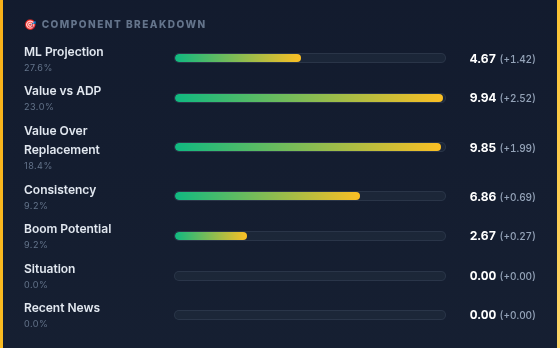 One weighted row per component, each with its 0–10 value and (in parentheses) its contribution to the final score. Zero-weight rows (Situation, Recent News here) still show, at zero.
One row per component. The live set (see the formula for the authoritative weights): ML Projection, Value vs ADP, Value Over Replacement, Consistency, Boom Potential, Situation, Recent News. Each row shows:
- Label — human-readable ("ML Projection", "Value vs ADP", etc.).
- Weight — the weight as a percent, to match the formula.
- Fill bar —
width = value / 10 × 100%, gradient from position color to gold. - Value (contribution) — the 0–10 value, and in parentheses the contribution to the final score (
value × weight × position_multiplier). The contributions sum to the PigPro score.
A component with a 0% weight (like Situation and Recent News for Bijan above, during a quiet offseason) still shows its row, at zero — so the card is honest about what did not move the score.
The contribution math is live
These numbers are read directly from player_projections.model_features (JSONB) for the latest scoring run — they're not retroactively computed in the browser. If the formula changes, restart pigpro-scoring and the cards update on the next refresh.
Context section
 Draft pedigree and market context. Rows only appear when we have the data — here just NFL Draft, since Yahoo ADP is offline and Bijan predates our combine coverage.
Only shown when there's data in at least one row.
- League ADP — live Yahoo ADP from
adp_records(source='yahoo'), refreshed daily by theyahoo-adp-persistCronJob. Shows mean pick number, average round, and percent drafted. - NFL Draft — year, round, overall pick. Pulled from
nflverse_player_ids.draft_*fields. - Combine — 40 time, weight, vertical, broad jump, cone, shuttle. Only recent classes have data (2024 onward in our table).
Offseason situation
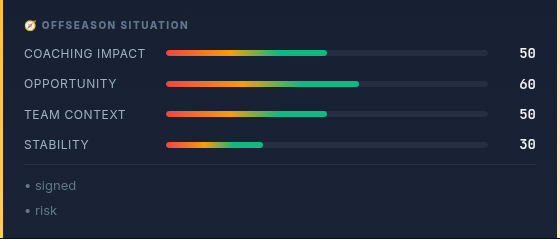 The four 0–100 situation subscores that roll up into the hero's
 🧭 badge, with driver tags below.
Four 0–100 subscores that grade a player's situation rather than his production:
Coaching Impact, Opportunity, Team Context, and Stability. They roll up
into the composite 🧭 situation badge in the hero (e.g. Stable 49). Below the bars,
short tags summarize the drivers (e.g. "signed", "risk"). This section powers the
Situation component in the breakdown above.
News impacts
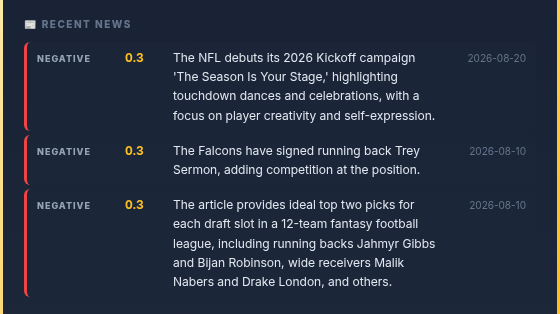 Up to three recent items, each with a direction badge, magnitude, the LLM's one-line reason, and the date.
If the news-digest CronJob has extracted recent news for this player, up to 3 items show here. Each row:
- Direction badge — color-coded left border (green positive, red negative, gray neutral).
- Magnitude score (0–1).
- One-sentence reason (what the LLM said the news means).
- Date.
During deep-offseason quiet periods this section can be empty; once camp and preseason news flows (as above) it fills in, and during the season with real beat-writer news it lights up.
30-day sparkline
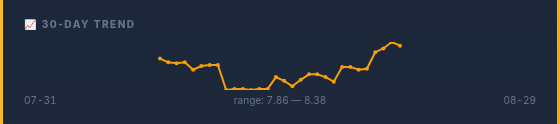 The last 30 daily pigpro_score snapshots, with the date range and the player's own min–max.
SVG polyline of the last 30 snapshots of this player's pigpro_score. Each daily pigpro-scoring run adds one row to pigpro_score_history; we plot them chronologically. Y-axis auto-scales to the player's own range, so a consistent-high player looks flat (by design — they ARE consistent).
If fewer than 2 snapshots exist (brand-new player, or first week of the tool), the section shows "No history yet — check back after a few daily snapshots."
Footer
- College (left) — pulled from
nflverse_player_ids.college. - Updated date (right) —
players.pigpro_updated_at. Typically same-day sincepigpro-scoringruns every morning.
How to open a card
| Surface | Trigger |
|---|---|
/draft-analytics |
Click the PigPro score cell (colored pill) in the Player Database table. |
/lineup |
Click the player's name OR PigPro pill. |
/waivers |
Click anywhere on the pickup card. |
/offseason-intel |
Click the expand arrow on a Player Focus List row; the inline expand shows subscores, clicking the name opens the full card. |
/players (Player Hub) |
Click any player name or player card. |
/draft, /draft-visualizations, dashboard |
Same — any element with data-player-name attribute. |
All surfaces share one JS module (static/js/pigpro-card.js) and one CSS file (static/css/pigpro-card.css). A legacy bridge catches any lingering openPlayerCard() / openPlayerCardByName() call sites and routes them to the same card.
Want more on the card?
See the formula for why the component weights are what they are, and the API reference for the exact response shape.